TRL AI — Vision Intelligence Platform
Solutions Farms & Livestock

Your farm, watched day and night.

TRL AI works with the cameras you already have. At night it rings you only for a real person. During the day it follows routine work, listens to your animals, and sends one clear report every morning.

Existing camerasBuilt-in microphonesTelegram & phoneEnglish · తెలుగు
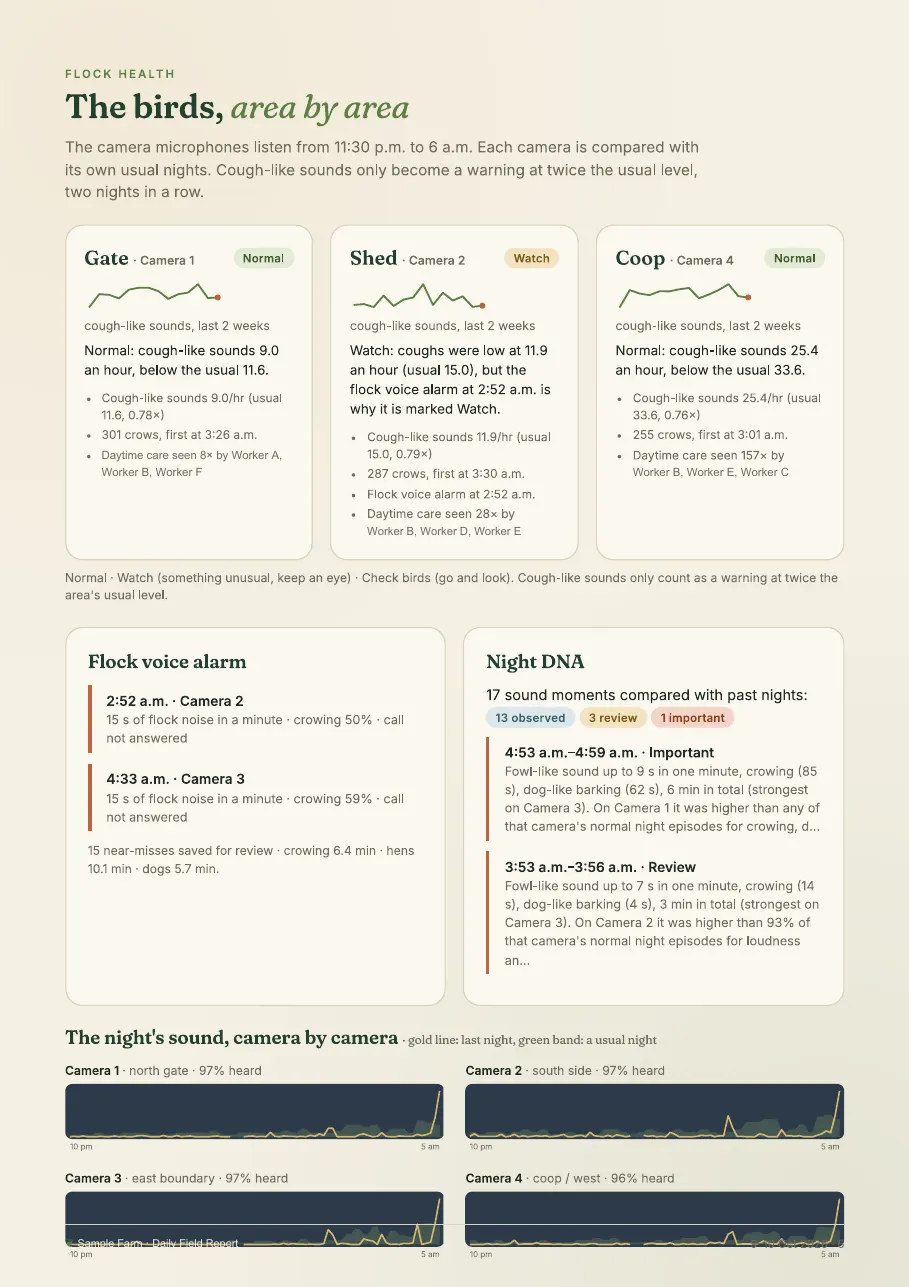
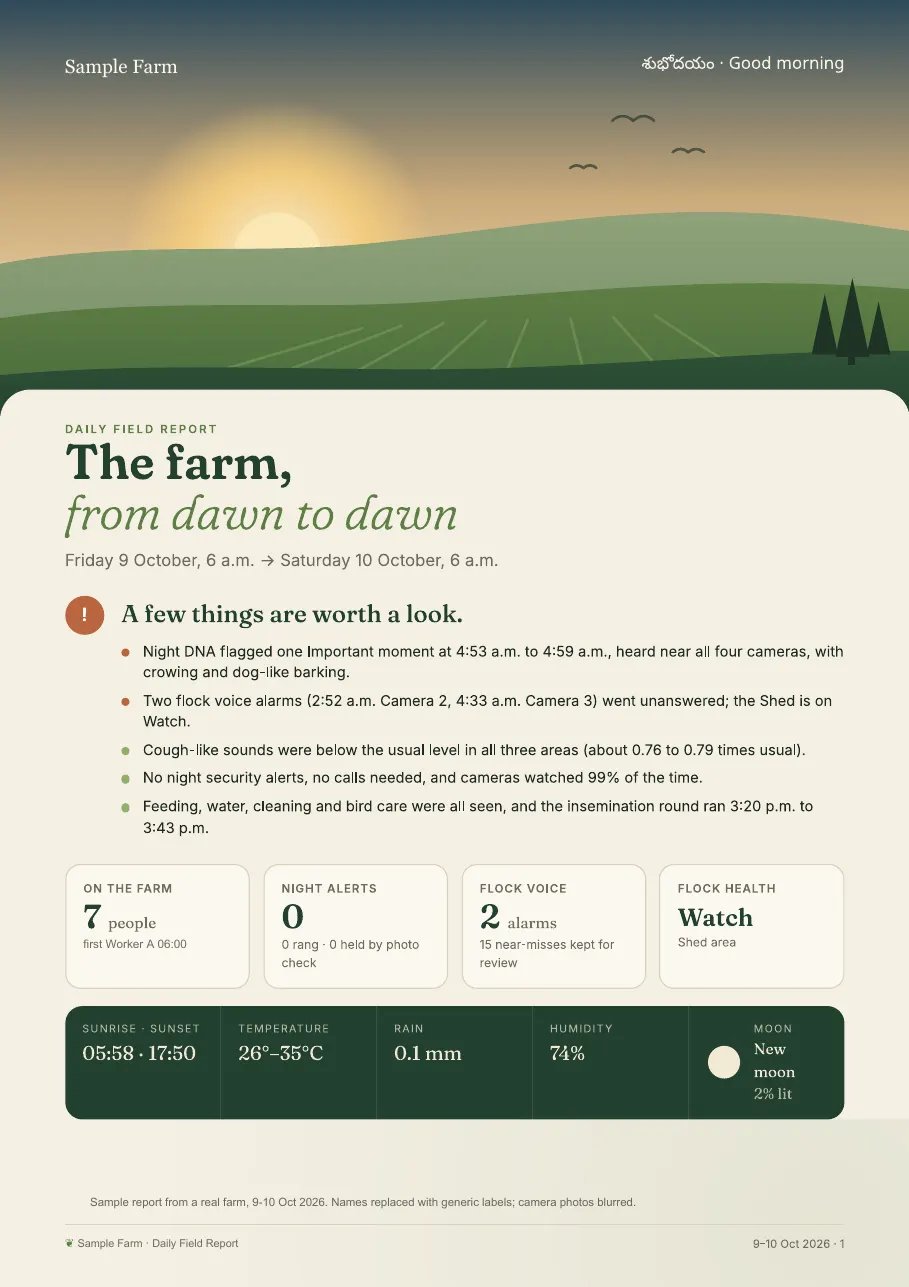
Sample Daily AI Site Report cover from a working farm: key points, people on the farm, night alerts, flock voice alarms and flock health Sample report page: 24 hours of people seen per camera, temperature and night sounds Sample report page: animal health by area with verdicts and night sound charts
Real report pages from a working farm. Names replaced with generic labels; camera photos blurred.
Multi-frame call check

Animals don't wake you up at night.

Before your phone rings, about six frames from the seconds around the event are checked. It rings only if at least two of them confirm a real person. Dogs, cattle and birds moving in the dark don't make it through.

When a call is held back, Telegram still receives the photo with a note, so nothing is hidden from you.

2 of 6 frames confirm a person: calling the owner
Camera 3, 1:14 AM: movement checked. 0 of 6 frames show a person, no call made.
Illustration · generic labels
Daily AI Site Report Included in every plan

Your site, summarised every morning.

At 6:10 AM a PDF covering the last 24 hours (6 AM to 6 AM) arrives by email and on Telegram.

  • The cover leads with the AI's key points of the day, plus people on site, alerts and animal health.
  • Inside: a 24-hour timeline, who was on site with photos, the routine-work check and night security events.
  • Animal health by area, a systems check, and a written analysis with a to-do list for the day.
  • Weather, sunrise and sunset for the day ahead.

No need to open a dashboard. Read one page with your morning tea.
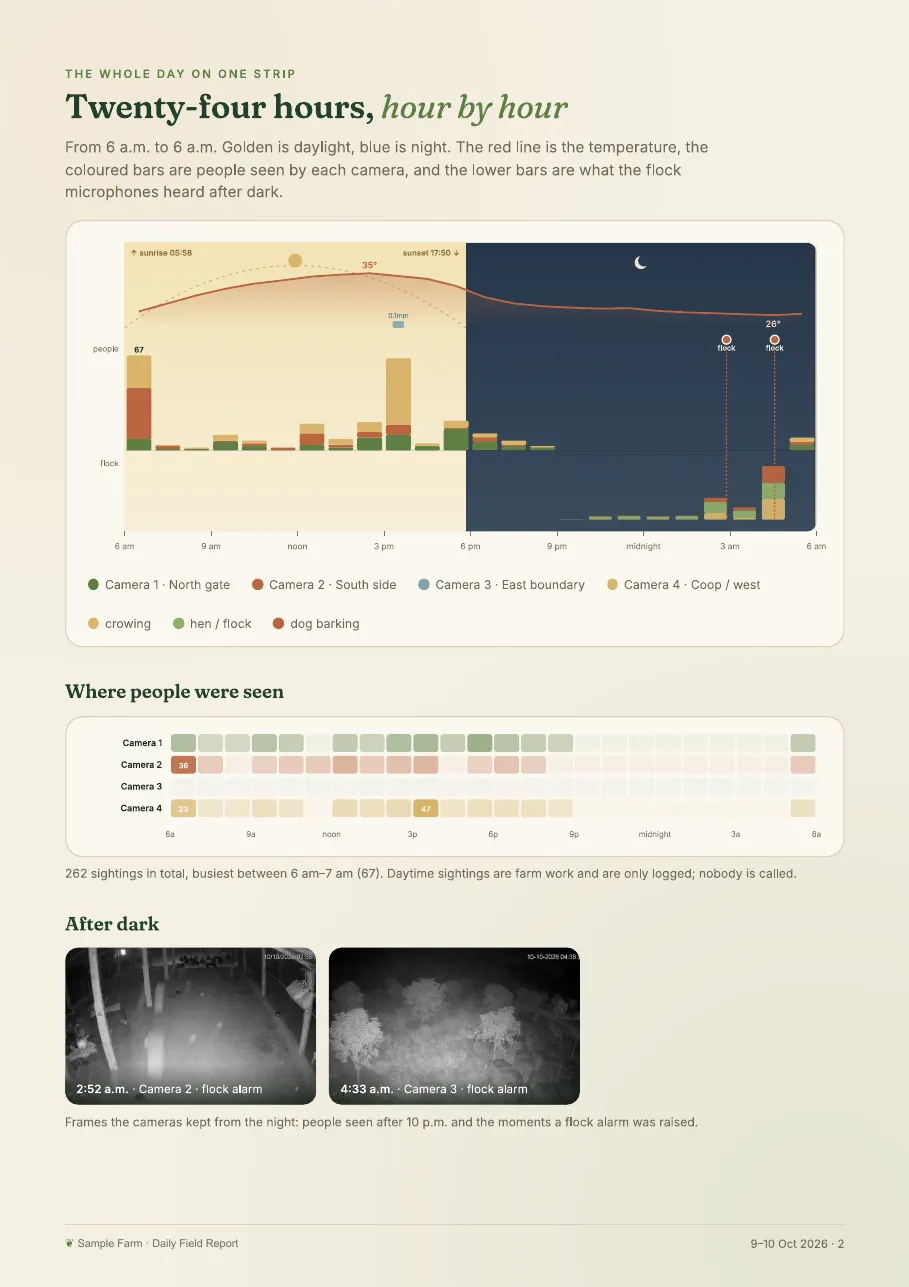
Sample report page: 24 hours of people seen per camera, temperature and night soundsSample report page: animal health by area with Normal and Watch verdicts and night sound charts
Real report pages from a working farm (PDF, 8 pages). Names replaced with generic labels; camera photos blurred.
People & Work Insights

Know your working day.

Built around routine and visitors: when work started, whether the usual jobs were done, and who dropped by.

  • Recognises regular people on site and shows each person's arrival, departure and time on camera as a timeline.
  • Reads the work that was seen, such as feeding, cleaning and handling animals, and marks each routine job done, late or not seen against its usual time.
  • When someone unknown appears, their photo arrives on Telegram asking "Who is this?" Your reply teaches the system.
  • An evening summary of the day arrives on Telegram.

Opt-in. People are informed and can ask for their data to be deleted.

Feeding Done
Cleaning Late
Water Not seen
Someone new at Camera 2, 3:42 PM. Who is this?
Visitor, feed delivery
Illustration · generic labels
Livestock Sound Monitoring

Hear problems before you see them.

Uses the microphones already built into your cameras. No new hardware. An early warning to go and look, not a diagnosis.

  • Night health watch: counts cough-like sounds and calls in each area and compares them with that area's own normal nights.
  • Distress alarm: detects sudden flock noise, such as when a predator gets close, and can ring you.
  • Night DNA Shadow mode: compares each night with earlier nights and flags unusual sound episodes for review. It never sends messages or calls and runs beside the live distress alarm.
  • Each area gets a daily verdict: Normal, Watch or Check animals.
4:31 AM flock alarm 10 PM 2 AM 6 AM
TonightNormal night for this area
GateCamera 1Normal
ShedCamera 2Watch
CoopCamera 4Check animals
Illustration · generic labels

More control.
Clearer evidence.

Go beyond the alert. Explore your camera layout, trace a detection, listen to a night’s sound and understand what happened across your farm.

Explore the camera layoutIllustrative site plan
Poultry shed
Outdoor run
Entrance access

Select a camera to change the preview. This diagram explains the site-view concept; it is not a live farm map.

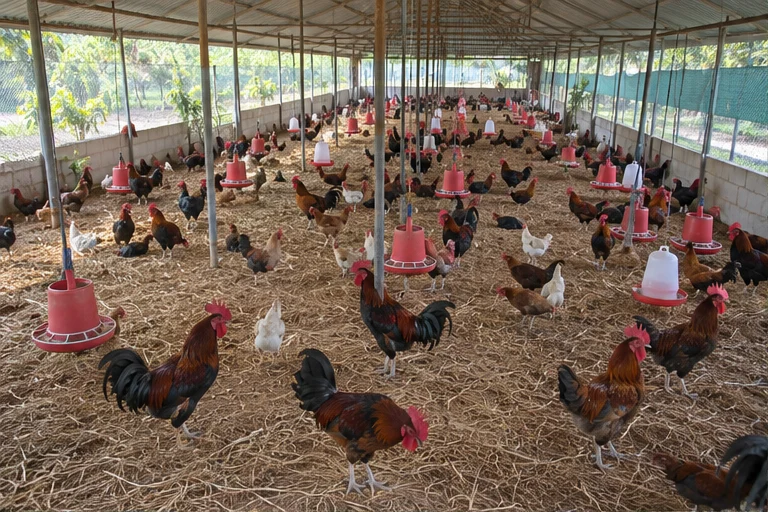
AI-generated illustrative camera view: Roosters and hens inside a poultry shed
Poultry shedIllustrative camera view

A farm you can explore.

The 3D site workspace connects camera locations with a shared farm layout. Select a building or camera, use landmark labels and direction guides, and reveal covered areas with a roof cutaway.

Site geometry is approximate and prepared for the deployment. These AI-generated rooster-farm stills demonstrate camera selection.

The tools behind the view

Live cameras, with soundMove from the whole farm to a single feed.
  • Watch and listen. Open a camera fullscreen and listen to its audio where the connected feed supports it.
  • Control each feed. Enable or disable detection per camera from the camera workspace. Live viewing and scheduled AI monitoring are separate controls.
  • Know what is connected. See each camera’s channel, frame rate and recent connection status before investigating an event.
See what the detector sawFollow the evidence before an alert exists.
  • Minute-by-minute audit. Review local scans across cameras, with captured images and the TRL AI classification.
  • Keep the raw results. The local audit includes candidates recorded before the verification threshold, including candidates below the API gate.
  • Separate the stages. Distinguish a local candidate from an AI verdict and an alert. A detection does not automatically mean a call was made.
Find an event. Keep its evidence.Search the history and open the original frame.
  • Filter the history. Narrow events by date, time range, camera, status and confidence rather than scrolling through every sighting.
  • Review the context. Open an event’s timestamp, zone, confidence and status. Download its original image for closer review.
  • Follow the response. Review delivery history and acknowledgement for alerts. Video clips appear where clip recording is enabled; an event may have no recorded clip.
Listen to the evidenceCamera online does not always mean microphone working.
  • Check microphone health. See whether audio actually reaches the edge device, plus audio coverage and loudness per microphone.
  • Read the night timeline. Inspect minute-level sound events including possible distress, rooster crowing and dog barking. Gaps show when audio was not received.
  • Replay what happened. Alarm, suppressed-alarm and near-miss records retain the preceding 30 seconds of sound and matching camera frames. Detection and call delivery are shown separately.
Learn your flock’s normal nightsWhole-night health trends and shadow-mode comparisons.
  • Night health. Compare sound rates with each microphone’s own earlier nights. Open hourly spectrum views to inspect the recordings behind a change.
  • Help the sound model learn. Listen to uncertain examples and label what was heard. These reviewed sounds help adapt classification to your flock.
  • Night DNA, in shadow mode. Compare unusual incidents with each camera’s normal nights and review their recordings. Night DNA never sends messages or calls; it runs beside the live distress alarm.

Sound patterns are an early warning to check your animals, not a diagnosis. Night DNA is an evaluation feature, not an active alarm.

Recognise familiar facesA reference-photo registry for trusted people.
  • Register a person. Add a name, role and reference photo so the system can label familiar faces.
  • Reduce unnecessary alerts. Registered trusted faces can be recognised and their alerts suppressed. Review registrations and recognition results for your deployment.
  • Respect people’s choices. People & Work Insights remains opt-in. Inform people about recognition and provide a way to request deletion.
Ask in your own wordsEnglish or Telugu, typed or spoken.
  • Speak or type. Use voice question input on the dashboard where microphone access is available, or enter your question in text.
  • Explore your farm records. Ask about night activity, a phone alarm, flock health, camera status, busy cameras or the weather. Return to earlier conversations through chat history.
  • Stay in control. The assistant reads camera, microphone and report records. It cannot change settings or switch monitoring on or off.
Your monitoring, at a glanceA clear overview before you open a workspace.
  • See system posture. The overview brings together the security score, cameras online, pending alerts and detection totals.
  • Keep night monitoring explicit. Enable or disable scheduled night AI monitoring while cameras remain available for live viewing.
  • Use the site’s actual schedule. Monitoring windows depend on the deployment. A working farm example uses 10 PM–5 AM; other sites and analysis tools can use different windows.

Farm questions

Will dogs or animals trigger calls?

No. Before a phone call goes out, about six frames from the seconds around the event are checked, and the phone rings only if at least two confirm a real person. If a call is held back, the photo still arrives on Telegram with a note.

Do I need to buy microphones?

No new hardware is needed. Livestock Sound Monitoring uses the microphones already built into compatible cameras. It is an early warning to go and look at your animals, not a diagnosis of disease.

What about the people who work on the farm?

People & Work Insights is opt-in. People are informed and can ask for their data to be deleted. It is designed around routine and visitors, not staff surveillance.

Which plan includes these features?

The Daily AI Site Report is included in every plan. People & Work Insights and Livestock Sound Monitoring are included in Growth and Enterprise. See pricing.

Farm demo

See it on your farm's cameras

Tell us about your cameras. We'll check compatibility and walk you through a sample morning report.

View Pricing

By submitting, you agree to our Terms and acknowledge our Privacy Policy.